QRFC(큐 RFC)의 개념
QRFC는 특정 순서에 따라 원격 함수 모듈(FM)을 대상 시스템에서 실행해야 할 때 사용하는 통신 방식입니다.
단순히 함수를 한 번 실행하는 tRFC와 달리, QRFC는 여러 개의 함수 모듈 호출을 **큐(Queue)**에 담아 순차적으로 처리합니다.
이러한 직렬화(Serialization)는 비즈니스 프로세스의 논리적 순서를 유지하는 데 매우 중요합니다.
예를 들어, 아래 예시처럼 항공편 데이터를 처리할 때, 생성(Creation) 작업이 갱신(Update) 작업보다 항상 먼저 일어나야 합니다. QRFC는 이러한 순서가 뒤바뀌지 않도록 보장하는 역할을 합니다.
사용 사례: 항공편 코드 관리
이 예시는 항공편 코드를 생성한 다음, 해당 코드를 대상 시스템에 업데이트하는 과정을 다룹니다.
- 요구사항: 프로세스가 반드시 순차적으로 진행되어야 합니다. 즉, 생성 작업이 먼저 완료된 후에만 갱신 작업이 진행되어야 합니다.
- 해결책: 두 함수 모듈(생성 FM, 갱신 FM)을 동일한 QRFC 큐에 순서를 지정하여 할당하면, 시스템은 이 순서를 철저히 지켜 실행합니다.
단계별 실행 과정:
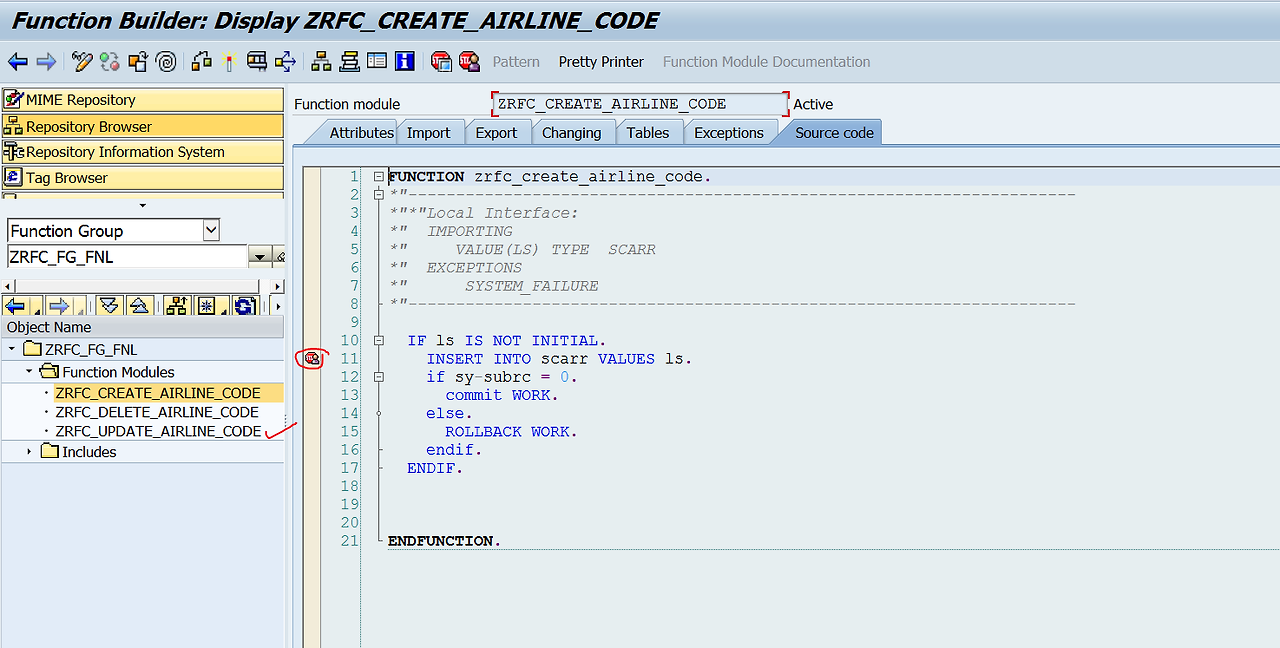
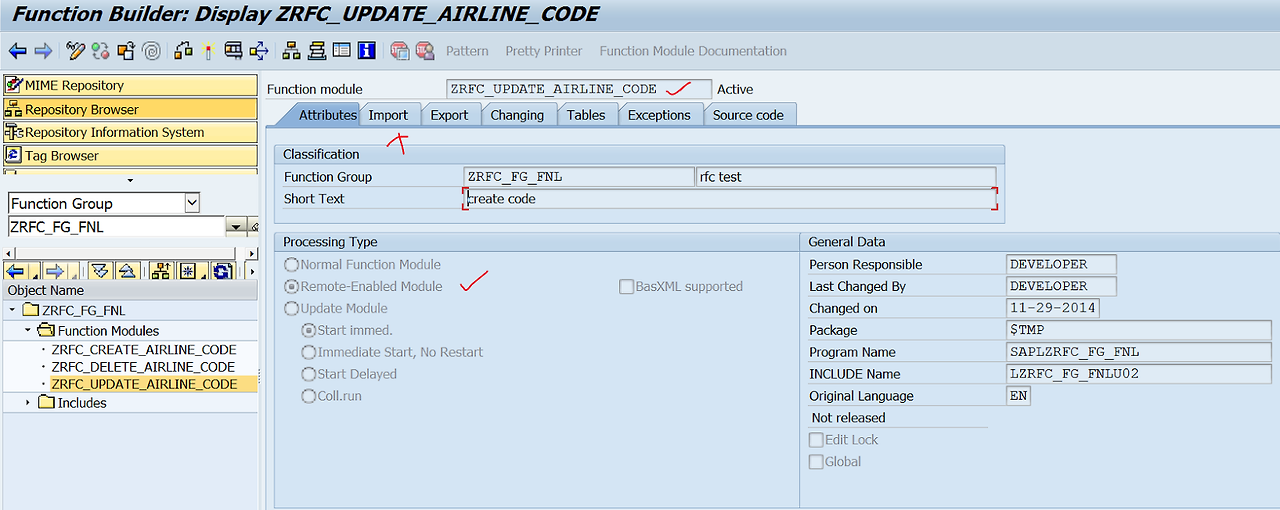
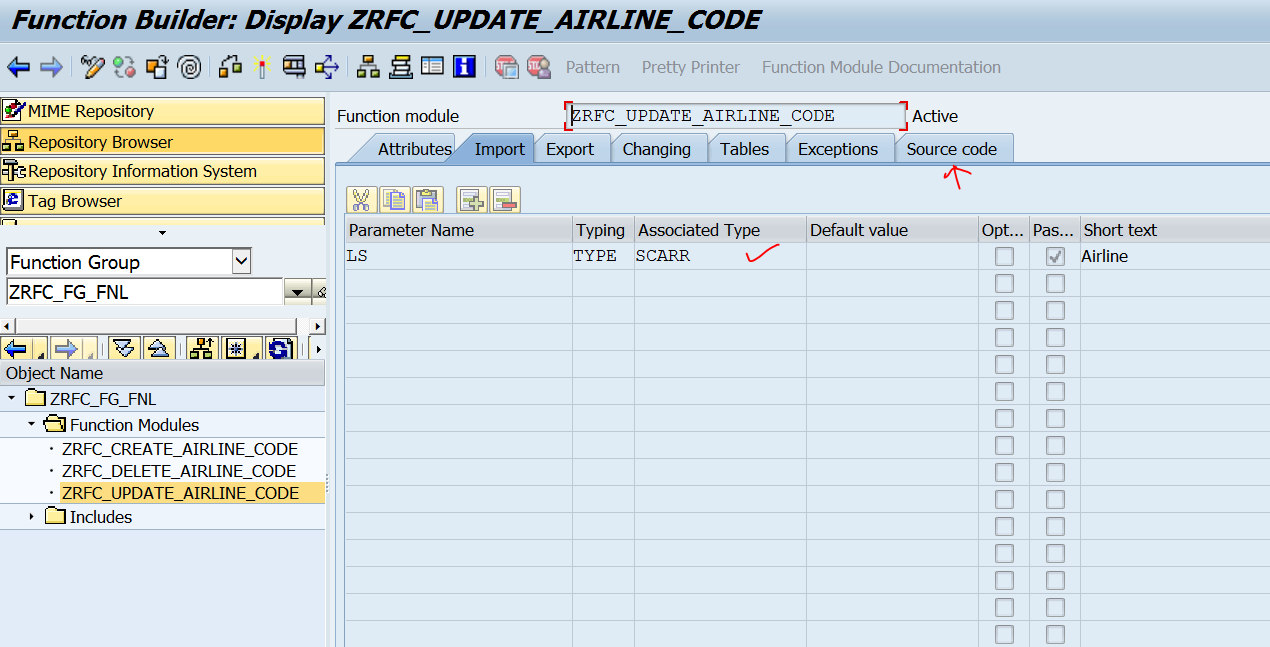
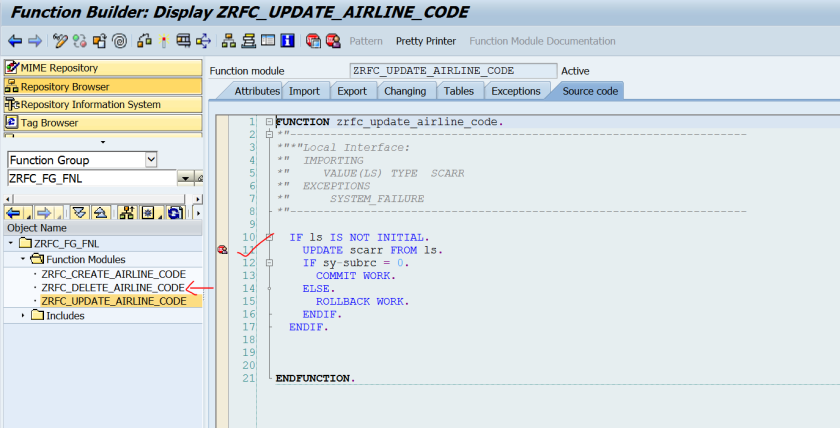
1단계-9단계: RFC 함수 모듈(FM) 생성
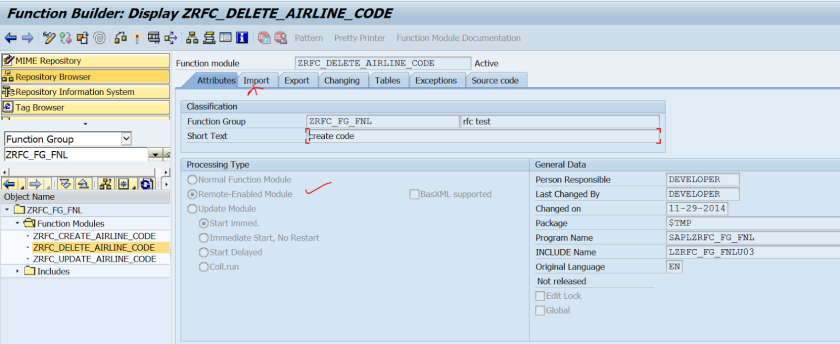
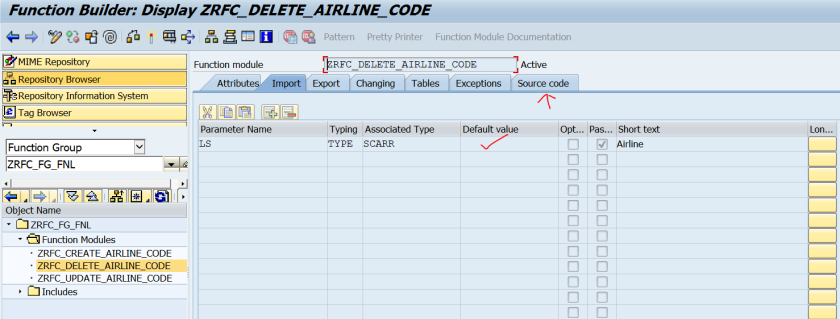
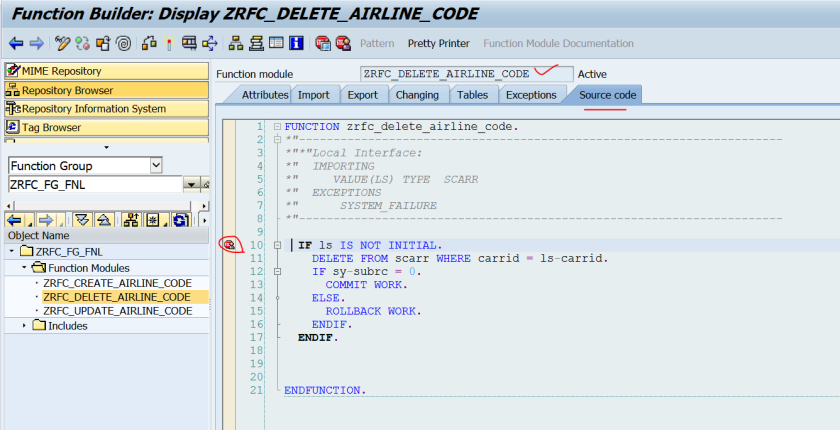
- 역할: 대상 시스템에서 원격 호출을 받아들일 3개의 함수 모듈을 생성합니다.
- ZRFC_CREATE_AIRLINE_CODE: 새로운 항공편 코드를 생성(데이터 INSERT)하는 FM.
- ZRFC_UPDATE_AIRLINE_CODE: 기존 항공편 코드 정보를 갱신(데이터 UPDATE)하는 FM.
- ZRFC_DELETE_AIRLINE_CODE: 항공편 코드를 삭제(데이터 DELETE)하는 FM.
- 기술적 특징: 이 함수 모듈들은 모두 **'RFC 지원 모듈(RFC Enabled Module)'**로 설정되어야 외부 시스템에서 호출이 가능합니다. 각 FM은 import parameter를 통해 필요한 데이터를 받습니다. 이 단계들은 QRFC의 최종 목표인 '순차적 실행'을 위한 준비 작업입니다.


10단계: 현재 데이터 상태 확인
- 기술적 의미: 테스트를 시작하기 전에 대상 테이블(SCARR 등)의 현재 상태를 확인하는 단계입니다. 이는 이후의 QRFC 실행이 성공적으로 데이터를 조작했는지 검증하기 위한 기준점 역할을 합니다.

호출 시스템 (Calling System) 설정 및 프로그램 실행
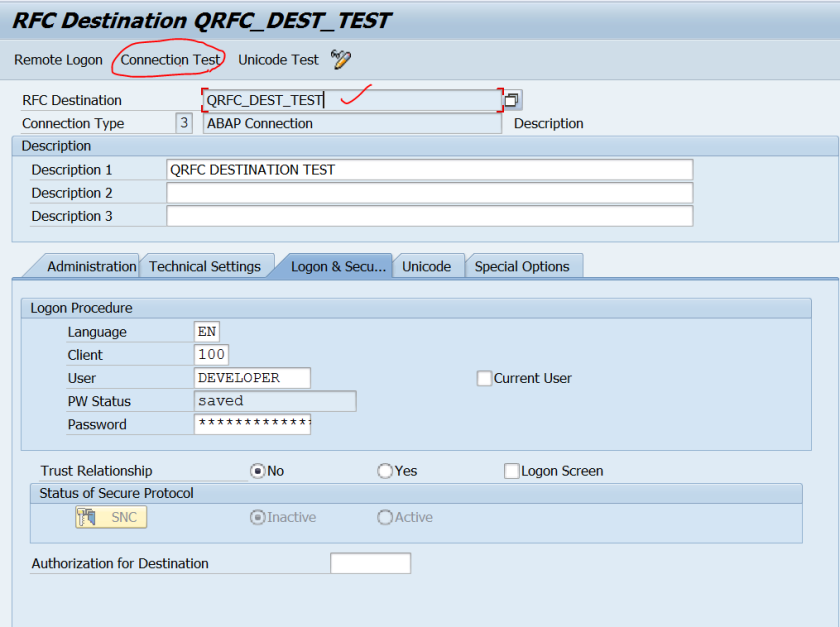
11단계-12단계: RFC 목적지(Destination) 연결 테스트
- 역할: SM59 트랜잭션을 사용하여 대상 시스템에 대한 RFC 목적지(QRFC_DEST_TEST)를 생성합니다.
- 기술적 의미: 이 단계는 송신 시스템과 대상 시스템 간의 네트워크 연결 및 인증 정보가 올바르게 설정되었는지 확인하는 필수적인 사전 점검 과정입니다.

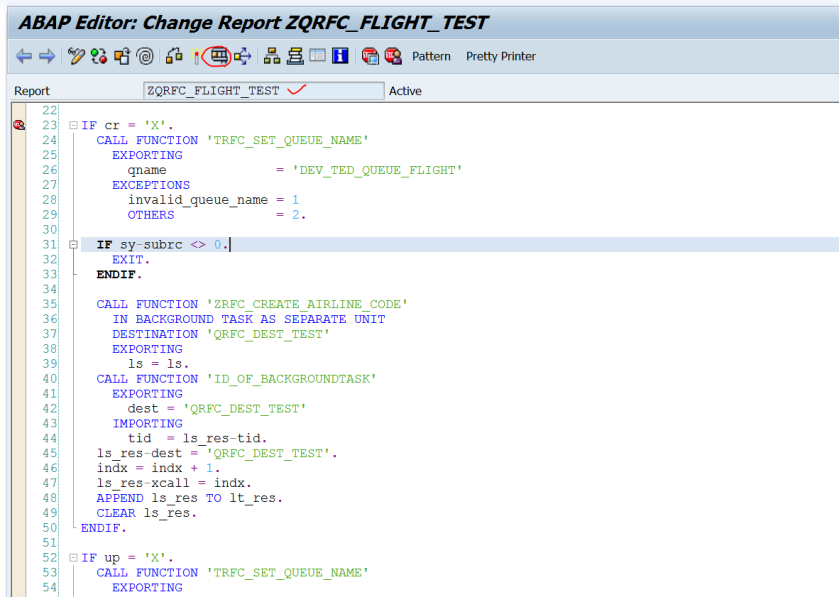
13단계: QRFC 호출 프로그램 작성
- 핵심: 이 단계는 QRFC의 작동 방식을 이해하는 데 가장 중요합니다.
- TRFC_SET_QUEUE_NAME FM을 호출하여 큐 이름(DEV_TED_QUEUE_FLIGHT)을 설정합니다. 이는 뒤이어 호출되는 모든 RFC FM이 동일한 논리적 큐에 묶이도록 지시하는 역할을 합니다.
- IN BACKGROUND TASK AS SEPARATE UNIT 구문을 사용하여 RFC를 tRFC/QRFC 형태로 호출합니다.
- '생성' FM 호출 후 '갱신' FM을 호출함으로써 두 작업의 실행 순서를 명시적으로 정의합니다.
- COMMIT WORK 문은 모든 RFC 호출을 큐에 담아 스케줄러에게 전달하는 최종적인 명령입니다. 이 명령이 실행되기 전까지는 아무런 작업도 시작되지 않습니다.
REPORT zqrfc_flight_test.

*----------------------------------------------------------------------*
* 유형 선언: 결과를 저장할 구조체
*----------------------------------------------------------------------*
TYPES:
  BEGIN OF ty_result,
    rfc_dest TYPE rfcdest,
    tid      TYPE arfctid,
    call_idx TYPE i,
  END OF ty_result.

*----------------------------------------------------------------------*
* 프로그램 선택 화면 정의
*----------------------------------------------------------------------*
SELECTION-SCREEN BEGIN OF BLOCK b1 WITH FRAME TITLE TEXT-001.
  PARAMETERS:
    p_carr TYPE scarr-carrid,
    p_cre  AS CHECKBOX, " 생성
    p_upd  AS CHECKBOX, " 갱신
    p_del  AS CHECKBOX. " 삭제
SELECTION-SCREEN END OF BLOCK b1.

*----------------------------------------------------------------------*
* 내부 변수 선언
*----------------------------------------------------------------------*
DATA:
  lt_result TYPE TABLE OF ty_result,
  ls_result TYPE ty_result.

DATA(ls_flight) = VALUE scarr( carrid = p_carr ).
DATA(call_counter) = 0.

*----------------------------------------------------------------------*
* QRFC 호출 로직
* TRFC_SET_QUEUE_NAME을 호출하여 모든 RFC를 동일한 큐에 할당합니다.
*----------------------------------------------------------------------*
IF p_cre = abap_true.
  CALL FUNCTION 'TRFC_SET_QUEUE_NAME'
    EXPORTING
      qname          = 'DEV_TED_QUEUE_FLIGHT'
    EXCEPTIONS
      OTHERS         = 1.

  IF sy-subrc <> 0.
    MESSAGE 'Failed to set queue name' TYPE 'E'.
    EXIT.
  ENDIF.

  CALL FUNCTION 'ZRFC_CREATE_AIRLINE_CODE'
    IN BACKGROUND TASK AS SEPARATE UNIT  " qRFC 호출 (별도의 단위로 백그라운드 태스크에서 실행)
    DESTINATION 'QRFC_DEST_TEST'
    EXPORTING
      ls_flight = ls_flight.

  CALL FUNCTION 'ID_OF_BACKGROUNDTASK'
    EXPORTING
      dest    = 'QRFC_DEST_TEST'
    IMPORTING
      tid     = ls_result-tid.

  call_counter = call_counter + 1.
  ls_result-rfc_dest = 'QRFC_DEST_TEST'.
  ls_result-call_idx = call_counter.
  APPEND ls_result TO lt_result.
  CLEAR ls_result.
ENDIF.

IF p_upd = abap_true.
  CALL FUNCTION 'TRFC_SET_QUEUE_NAME'
    EXPORTING
      qname          = 'DEV_TED_QUEUE_FLIGHT'
    EXCEPTIONS
      OTHERS         = 1.
  IF sy-subrc <> 0.
    MESSAGE 'Failed to set queue name' TYPE 'E'.
    EXIT.
  ENDIF.

  ls_flight-carrname = 'NEW CARRNAME'.  " 갱신을 위해 데이터 필드 설정
  CALL FUNCTION 'ZRFC_UPDATE_AIRLINE_CODE'
    IN BACKGROUND TASK AS SEPARATE UNIT
    DESTINATION 'QRFC_DEST_TEST'
    EXPORTING
      ls_flight = ls_flight.

  CALL FUNCTION 'ID_OF_BACKGROUNDTASK'
    EXPORTING
      dest    = 'QRFC_DEST_TEST'
    IMPORTING
      tid     = ls_result-tid.

  call_counter = call_counter + 1.
  ls_result-rfc_dest = 'QRFC_DEST_TEST'.
  ls_result-call_idx = call_counter.
  APPEND ls_result TO lt_result.
  CLEAR ls_result.
ENDIF.

IF p_del = abap_true.
  CALL FUNCTION 'TRFC_SET_QUEUE_NAME'
    EXPORTING
      qname          = 'DEV_TED_QUEUE_FLIGHT'
    EXCEPTIONS
      OTHERS         = 1.
  IF sy-subrc <> 0.
    MESSAGE 'Failed to set queue name' TYPE 'E'.
    EXIT.
  ENDIF.

  CALL FUNCTION 'ZRFC_DELETE_AIRLINE_CODE'
    IN BACKGROUND TASK AS SEPARATE UNIT
    DESTINATION 'QRFC_DEST_TEST'
    EXPORTING
      ls_flight = ls_flight.

  CALL FUNCTION 'ID_OF_BACKGROUNDTASK'
    EXPORTING
      dest    = 'QRFC_DEST_TEST'
    IMPORTING
      tid     = ls_result-tid.

  call_counter = call_counter + 1.
  ls_result-rfc_dest = 'QRFC_DEST_TEST'.
  ls_result-call_idx = call_counter.
  APPEND ls_result TO lt_result.
  CLEAR ls_result.
ENDIF.

*----------------------------------------------------------------------*
* 모든 호출을 트리거하는 COMMIT WORK
*----------------------------------------------------------------------*
COMMIT WORK.

*----------------------------------------------------------------------*
* 결과 출력 (cl_demo_output 사용)
*----------------------------------------------------------------------*
IF lt_result IS NOT INITIAL.
  cl_demo_output=>display(
    EXPORTING
      value = lt_result
      name  = 'QRFC Calls Log'
  ).
ELSE.
  cl_demo_output=>write( 'No QRFC calls selected.' ).
ENDIF.
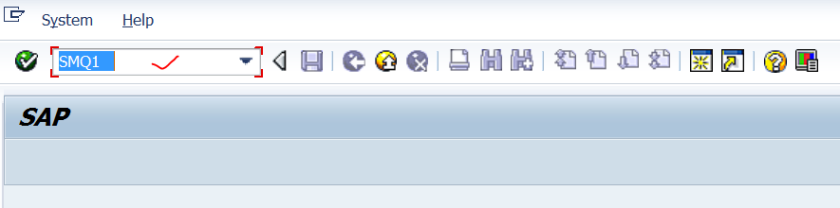
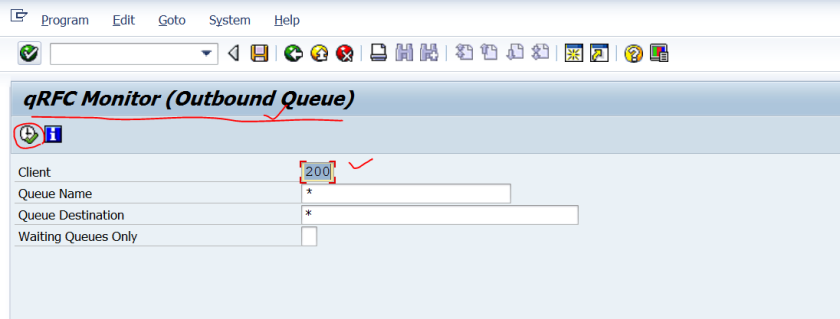
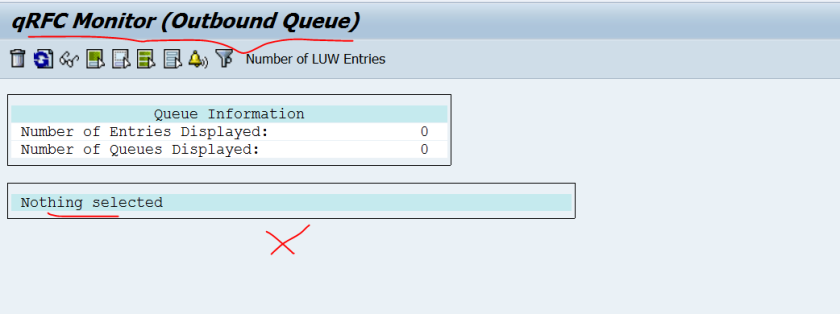
14단계-16단계: 아웃바운드 큐 확인 (SMQ1)
- SMQ1 역할: 송신 시스템의 **아웃바운드 큐(Outbound Queue)**를 모니터링하는 트랜잭션입니다.
- 의미: COMMIT WORK 실행 전에는 큐에 아무런 항목도 없음을 확인합니다. 이는 모든 호출이 메모리에만 존재하며, 아직 큐에 등록되지 않았음을 의미합니다.
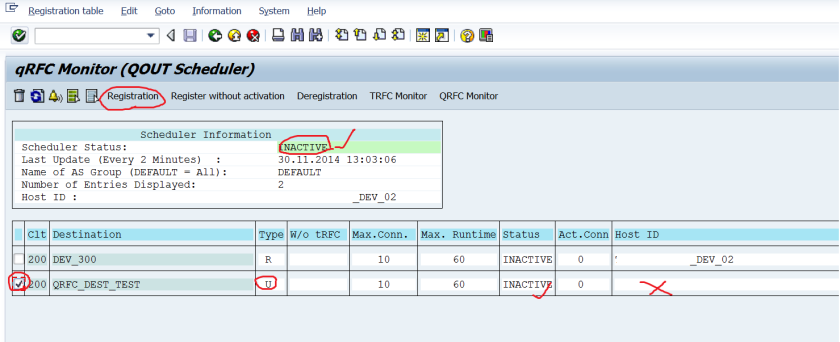
17단계-24단계: 아웃바운드 스케줄러 설정 (SMQS)
- SMQS 역할: QRFC 스케줄러를 관리하는 트랜잭션입니다. 스케줄러는 SMQ1에 쌓인 큐를 읽어 실제로 대상 시스템으로 전송하는 역할을 합니다.
- 기술적 의미:
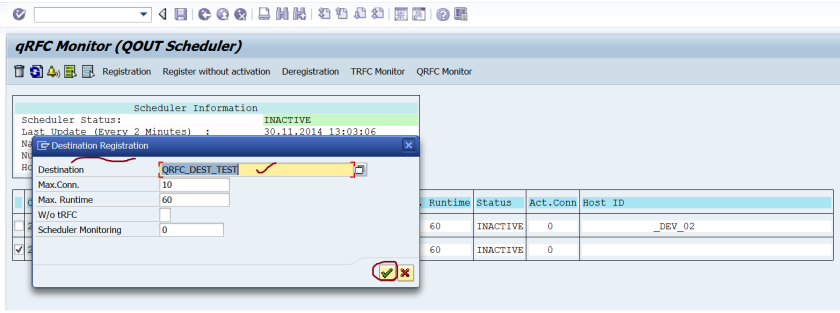
- RFC 목적지 등록(Registration): SMQS에 RFC 목적지를 등록(R 타입)하면, 해당 목적지로 전송되는 큐가 자동으로 처리됩니다.
- 등록 해제(Deregistration): 데모 목적을 위해 U 타입(등록 해제)으로 설정하여 자동 실행을 막습니다. 이는 COMMIT WORK 후 큐가 생성되더라도 바로 실행되지 않고 SMQ1에서 대기하는 상태를 인위적으로 만들기 위함입니다. 실제 운영 환경에서는 대부분 R 상태로 유지됩니다.
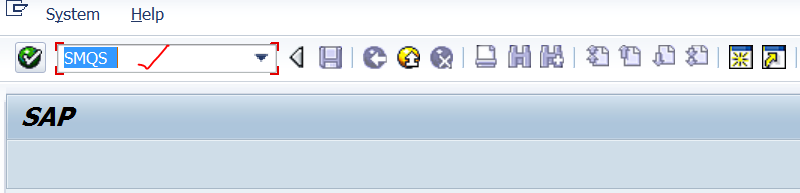
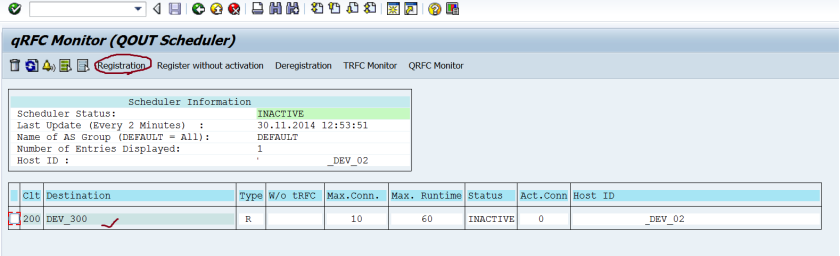
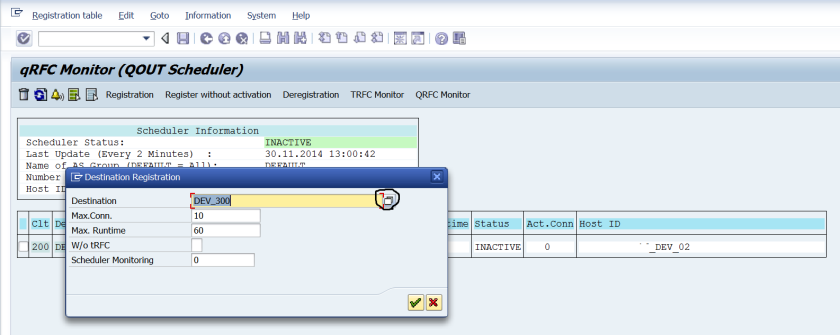

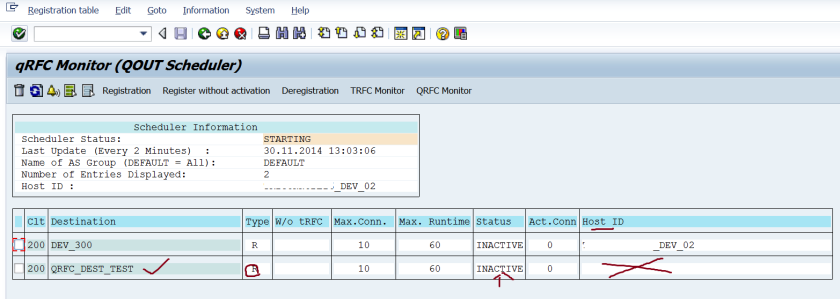


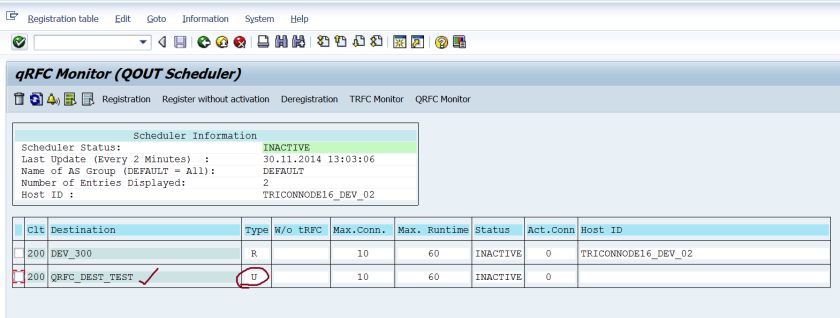
사실 SMQS 트랜잭션에서 RFC Destination을 등록할 필요는 없습니다.
프로그램에서 qRFC 개념을 사용하여 RFC 대상을 지정하고, 이후 커밋 작업 명령문이 프로그램에서 실행될 때마다
RFC Destination이 R 유형으로 이 트랜잭션에 자동으로 추가되고 스케줄러가 처리를 시작합니다.
데모 프로세스에서는 RFC 대상의 정확한 작동 방식을 이해해야 하므로 RFC 대상을 등록하고 R에서 U 유형으로 지정했습니다.
나중에 큐 펑션 모듈 실행하기 위해 R로 지정할 것입니다.
25단계-30단계: 프로그램 실행 및 디버거 분석
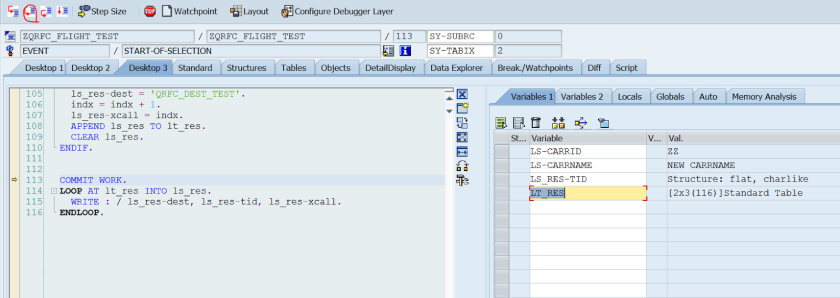
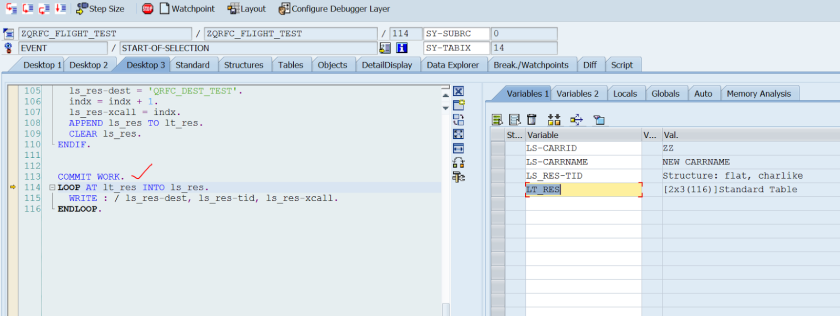
- 디버깅의 중요성: 이 단계는 COMMIT WORK가 실행되기 전과 후의 시스템 상태를 명확히 보여줍니다.
- 기술적 의미:
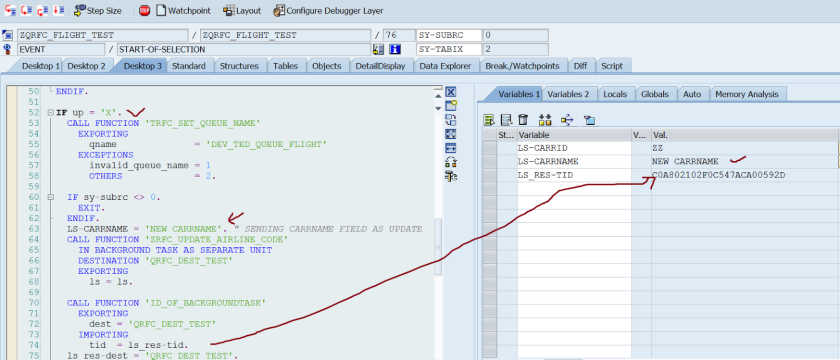
- 26단계: IN BACKGROUND TASK AS SEPARATE UNIT 구문이 실행될 때마다 내부적으로 **트랜잭션 ID(TID)**가 생성됩니다.
- ID_OF_BACKGROUNDTASK FM을 통해 이 TID를 가져올 수 있습니다. 이는 두 호출이 별개의 논리적 단위로 존재함을 보여줍니다.
- 28단계-29단계: COMMIT WORK 실행 전 LT_RES 테이블을 확인하면, 생성 및 갱신 호출에 대한 두 개의 독립적인 TID가 존재하는 것을 볼 수 있습니다. 아직 큐에 등록되지 않은 상태입니다.
- 26단계: IN BACKGROUND TASK AS SEPARATE UNIT 구문이 실행될 때마다 내부적으로 **트랜잭션 ID(TID)**가 생성됩니다.




31단계-33단계: 큐 상태 확인 (SMQ1)
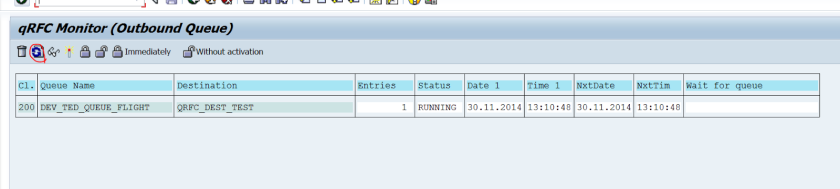
- 의미: COMMIT WORK가 완료된 후 SMQ1을 확인하면, 'DEV_TED_QUEUE_FLIGHT'라는 이름의 큐 하나가 생성된 것을 볼 수 있습니다.
- 기술적 핵심: 두 개의 개별적인 RFC 호출(생성, 갱신)이 하나의 논리적 큐 안에 순서대로 묶여 있음을 확인합니다. 이는 QRFC가 여러 호출을 하나의 작업 단위로 취급하고 직렬화를 보장함을 증명합니다.
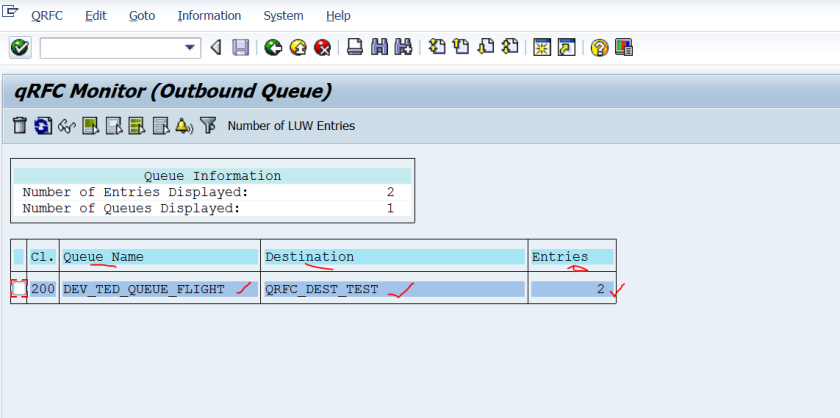
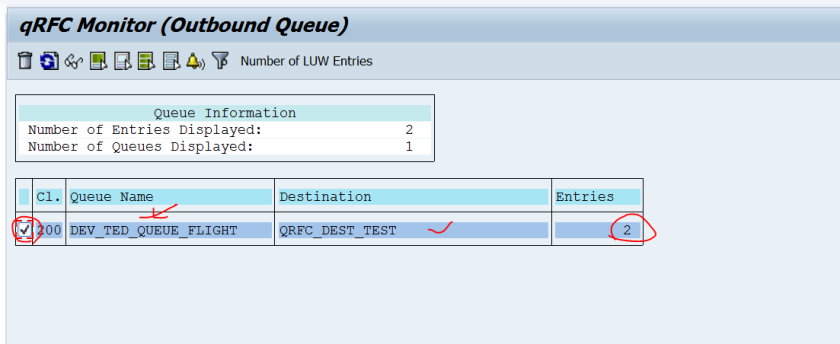
34단계-36단계: SMQS 및 SMQ1 연동 확인
- 역할: SMQS에서 SMQ1로 직접 이동하는 기능을 사용하여 두 트랜잭션이 논리적으로 연결되어 있음을 확인합니다.
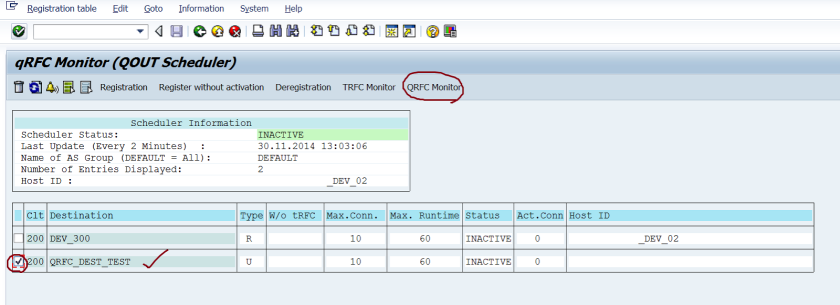
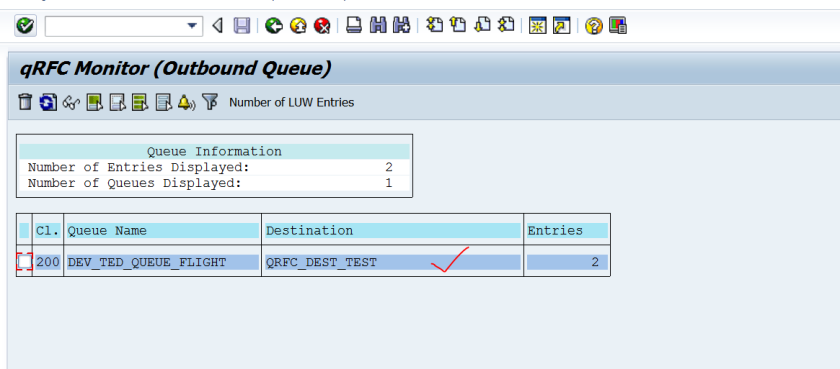
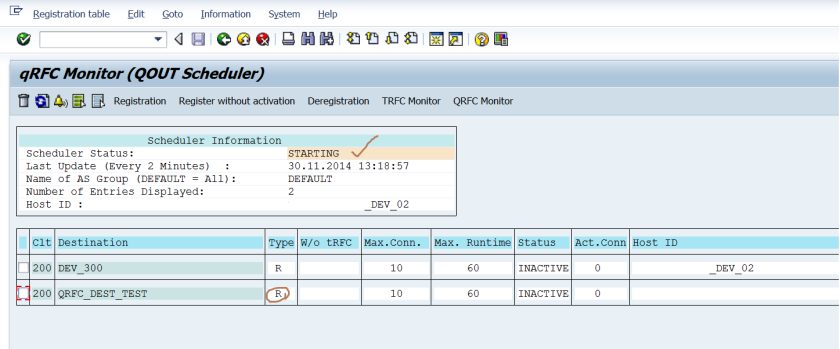
37단계-39단계: QRFC 스케줄러 활성화
- 기술적 의미: SMQS에서 RFC 목적지를 다시 **등록(R 타입)**합니다. 이 순간 스케줄러가 'Inactive' 상태에서 'Starting' 상태로 전환되며, SMQ1에 대기 중이던 큐를 즉시 처리하기 시작합니다. 디버그 포인트가 설정되어 있다면, 대상 시스템에서 함수 모듈의 실행이 시작되는 것을 확인할 수 있습니다.
대상 시스템에서 실행 및 검증
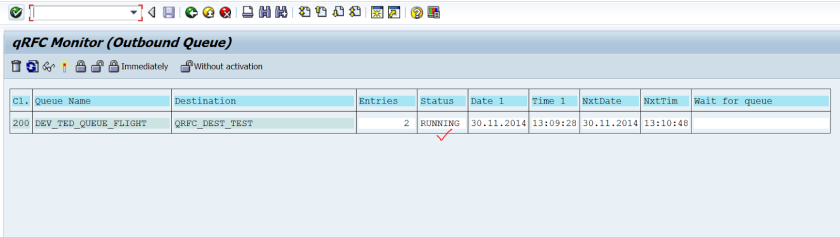
40단계-42단계: 첫 번째 FM 실행 및 상태 확인
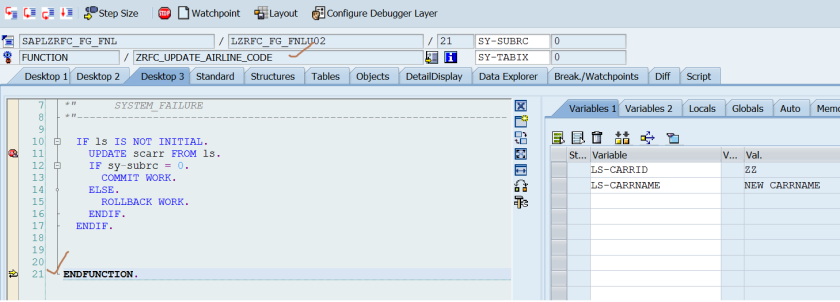
- 의미: 디버거가 첫 번째 FM(생성)에서 멈춥니다.
- 상태:
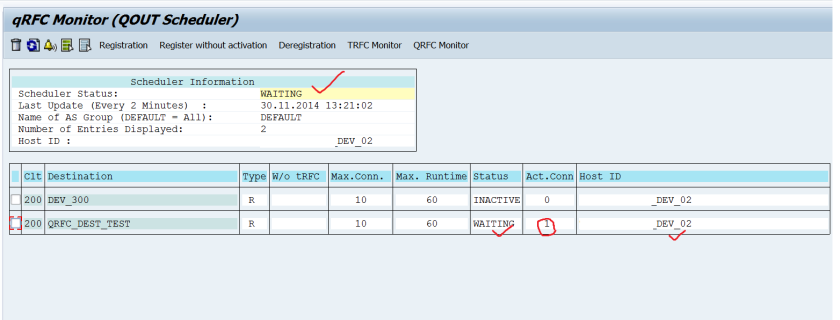
- SMQ1: 큐의 상태가 **'Running'**으로 바뀌고, 첫 번째 항목이 실행 중임을 표시합니다.
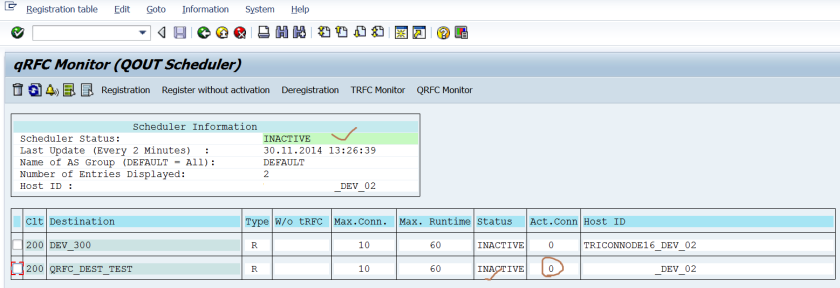
- SMQS: 스케줄러 상태는 **'Waiting'**으로 표시됩니다. 이는 호출이 성공적으로 전달되었고 대상 시스템의 응답을 기다리고 있음을 나타냅니다.

43단계-46단계: 첫 번째 FM 완료 및 두 번째 FM 시작
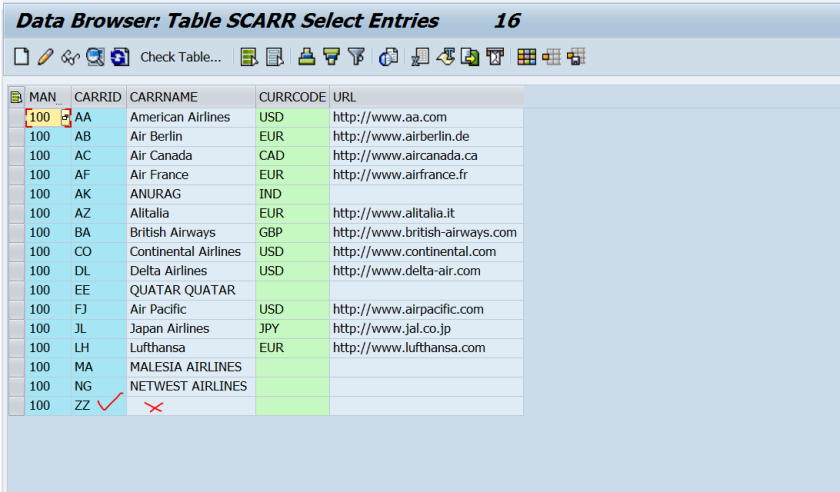
- 의미: 디버거에서 F8을 눌러 생성 FM을 완료합니다.
- 결과:
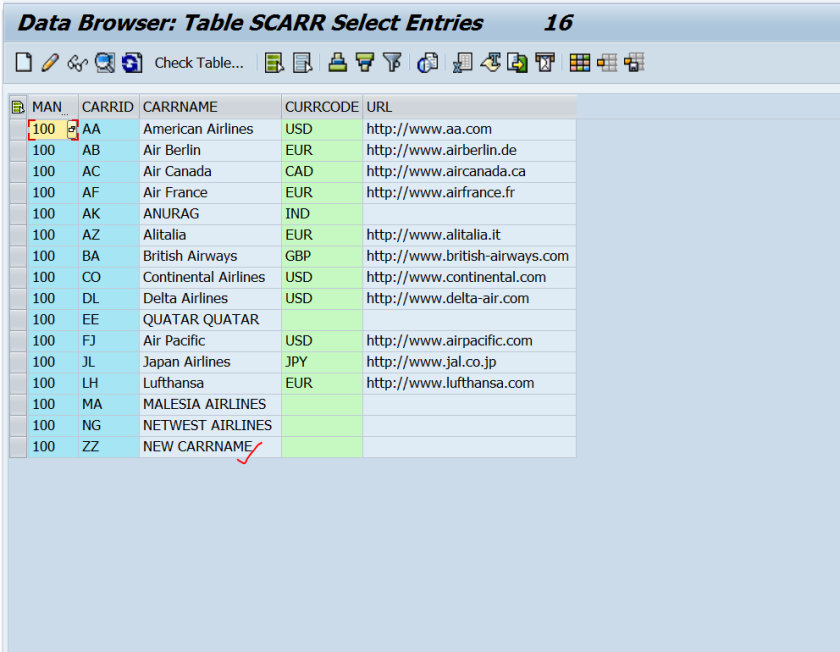
- 대상 테이블: 'ZZ'와 같은 새로운 항공편 코드가 성공적으로 생성되었음을 확인합니다.
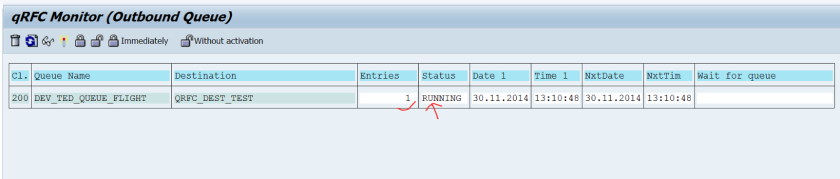
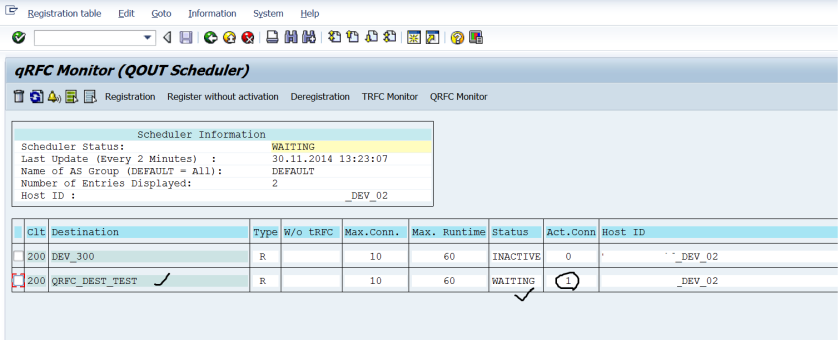
- SMQ1: 첫 번째 항목이 완료되고, 두 번째 항목(갱신)이 'Running' 상태로 전환됩니다.


47단계-52단계: 전체 프로세스 완료
- 의미: 디버거에서 F8을 눌러 두 번째 FM(갱신)도 완료합니다.
- 최종 결과:
- 대상 테이블: 항공편 코드의 이름이 'NEW CARRNAME'으로 성공적으로 갱신되었음을 확인합니다.
- SMQ1: 큐가 비어 있음을 확인합니다. 모든 항목이 성공적으로 처리되었습니다.
- SMQS: 스케줄러와 RFC 목적지 모두 상태가 다시 **'Inactive'**로 돌아옵니다. 이는 모든 작업이 완료되었고, 스케줄러가 유휴 상태에 있음을 의미합니다.
이러한 단계들을 통해 QRFC가 어떻게 여러 작업을 하나의 논리적 큐로 묶어 직렬성을 보장하고, 스케줄러가 이를 관리하는지 명확하게 이해할 수 있습니다.

'SAP' 카테고리의 다른 글
| CTS 시 주의사항 : 오브젝트 신규 생성 건 (0) | 2025.12.13 |
|---|---|
| [ABAP] qRFC 개발 실습 (1) | 2025.09.20 |
| [번역] tRFC in ABAP (0) | 2025.09.20 |
| SAP SM 장애대응절차 (0) | 2025.09.20 |
| SAP MM : Quotation (0) | 2025.09.19 |