반응형
SMQR에 Queue를 등록하고 Unregister 해둔다
The simplest qRFC calling program on ABAP server #SAP - Qiita
The simplest qRFC calling program on ABAP server - Qiita
qRFC is very useful way to call program many times chronologically. I've checked how to program and process types. Strong points Strong...
qiita.com
첫번째 게시물의 코드를 적당히 수정하여 다음과 같이 작성한다
Report YSIMPEST_QRFC

* Set an outbound queue name
  CALL FUNCTION 'TRFC_SET_QUEUE_NAME'
    EXPORTING
      qname              = 'YTEST01'
    EXCEPTIONS
      invalid_queue_name = 1
      OTHERS             = 2.
  IF sy-subrc <> 0.
    MESSAGE e001(00) WITH 'TRFC_SET_QUEUE_NAME error'.
  ENDIF.

* Call RFC module as qRFC
  CALL FUNCTION 'ZTEST_IM'
    IN BACKGROUND TASK
    AS SEPARATE UNIT.

  COMMIT WORK.
  IF sy-subrc <> 0.
    MESSAGE e001(00) WITH 'Commit error with return code:' sy-subrc.
  ENDIF.
qRFC with Outbound Queue & Inbound Queue – SAPCODES
qRFC with Outbound Queue & Inbound Queue
Step1. The inbound queue is always associated with an out bound queue for better tracking of the complex process. The below post demonstrates the inbound queue in the one SAP system.[The sa…
sapcodes.com
해당 게시물을 참조하여 queue를 등록하고 unregister 해두자.

FUNCTION ZTEST_IM.
	message 'Error' type 'E' display like 'E'.
ENDFUNCTION.
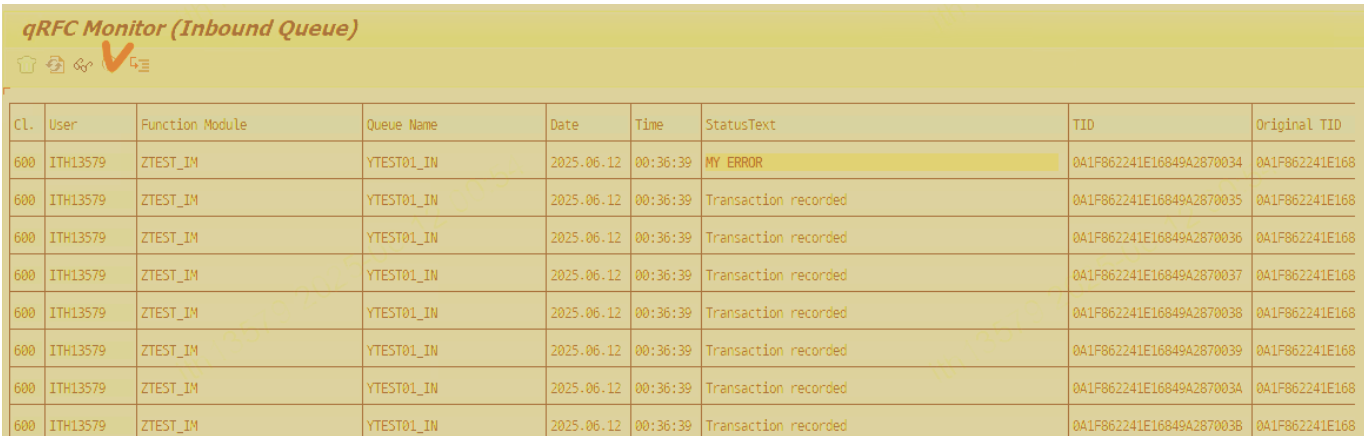
선택하고 실행해보면 다음과 같이 메세지가 있으면 Status Text가 남는 것을 볼 수 있다.
Key Function Modules for qRFC ABAP Code
To programmatically control qRFC, the following function modules are used within your custom ABAP code:
- TRFC_SET_QUEUE_NAME: Sets the queue name for the subsequent CALL FUNCTION ... IN BACKGROUND TASK. This is crucial for managing the processing order within a logical unit of work (LUW).
- TRFC_SET_QIN_PROPERTIES or TRFC_SET_QOUT_PROPERTIES: Sets properties for inbound (QIN) or outbound (QOUT) queues, respectively.
- CALL FUNCTION ... IN BACKGROUND TASK DESTINATION 'NONE': This is the core syntax to register the function module for asynchronous execution within the queue. The destination is often 'NONE' when using the current system's queue, or a specific RFC destination (defined in SM59) when communicating between systems (e.g., ERP and EWM).
- COMMIT WORK: Triggers the actual processing of the queued function calls.
DATA: lv_queue_name TYPE trfcqin-qname.

* Define a unique queue name (e.g., based on document number)
CONCATENATE 'Z_DLVRY_' some_delivery_number INTO lv_queue_name.

* Set the queue name for the following function call
CALL FUNCTION 'TRFC_SET_QUEUE_NAME'
  EXPORTING
    qname                 = lv_queue_name
  EXCEPTIONS
    invalid_queue_name    = 1
    OTHERS                = 2.

IF sy-subrc = 0.
* Call the function module in background task (qRFC)
  CALL FUNCTION 'Z_EWM_PROCESS_DELIVERY' IN BACKGROUND TASK DESTINATION 'NONE'
    TABLES
      it_delivery_data = lt_delivery_data.
ENDIF.

* Commit the work to trigger the qRFC processing
COMMIT WORK.
반응형
'SAP' 카테고리의 다른 글
| [EWM Trobleshooting] Enter a warehouse process type error (0) | 2025.12.29 |
|---|---|
| CTS 시 주의사항 : 오브젝트 신규 생성 건 (0) | 2025.12.13 |
| [번역] qRFC with outbound Queue ( no Inbound Queue) (1) | 2025.09.20 |
| [번역] tRFC in ABAP (0) | 2025.09.20 |
| SAP SM 장애대응절차 (0) | 2025.09.20 |