A Step-by-Step Guide to Automatic Account Determin... - SAP Community
A Step-by-Step Guide to Automatic Account Determination in SAP MM-FI Integration
Why is MM-FI Integration Required in SAP? In SAP, MM (Materials Management) handles procurement and inventory, while FI (Financial Accounting) manages financial transactions and reporting. Integrating these two modules is essential for real-time, accurate
community.sap.com
왜 SAP에서 MM-FI 통합이 필수적인가요?
SAP에서 **MM(자재 관리)**은 조달과 재고를 다루고, **FI(재무 회계)**는 재무 거래 및 보고를 관리합니다.
이 두 모듈을 통합하는 것은 물류 운영에 대한 실시간의 정확한 재무 회계를 위해 필수적입니다.
1. 실시간 재무 전표 전기
물품 입고(Goods Receipt) 시, MM은 재고 업데이트를 처리하고 FI는 재무적 영향을 관리합니다.
물품 입고 시 수동으로 G/L 계정을 전기하는 것을 피하기 위해,
SAP는 자동 계정 결정을 사용하여 MM과 FI를 원활하게 통합하고,
최소한의 노력으로 정확한 재무 전표가 생성되도록 합니다.
2. 수작업 감소
통합이 없다면, 사용자는 모든 거래마다 수동으로 G/L 계정을 지정해야 하므로 오류 위험이 커집니다.
자동 계정 결정(OBYC)과의 통합은 이러한 의존성을 제거합니다.
3. 정확한 재고 평가
MM에서의 재고 변동(예: 재고 이동, 소비)은 회사 가치에 영향을 미칩니다.
통합을 통해 FI 모듈은 이러한 변동을 즉시 반영하여 대차대조표를 정확하게 유지합니다.
결론적으로, MM-FI 통합은 SAP에서 원활한 재무 운영의 근간입니다.
이는 물류 프로세스가 최소한의 수작업과 최대한의 신뢰성으로 재무 장부에 정확하게 반영되도록 보장합니다.
자재 및 비자재 기반 조달 시나리오를 위한 단계별 설정
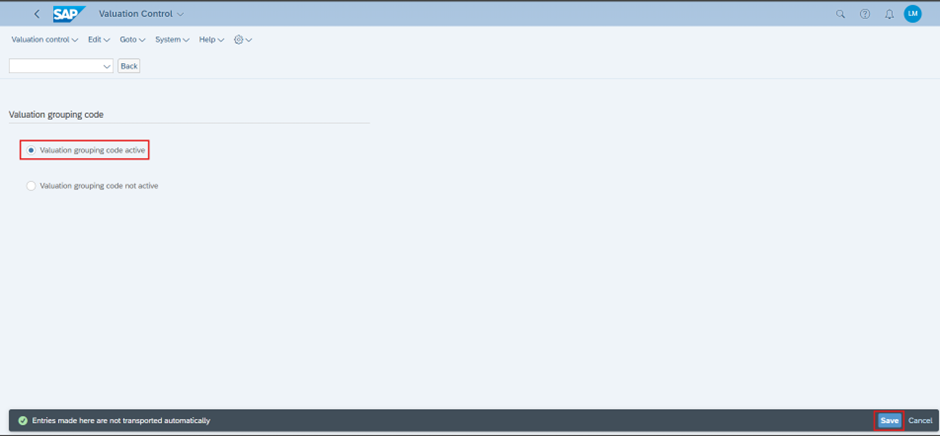
Step 1: Activate Valuation Grouping Code (Transaction: OMWM)
IMG > MM > Valuation and Account Assignment > Account Determination without Wizard > Define Valuation Control
평가 그룹화는 평가 영역(예: 플랜트)을 공통의 평가 그룹화 코드로 묶어 여러 플랜트에서의 계정 결정을 단순화합니다.
Step 2: Group Valuation Areas (Transaction: OMWM)
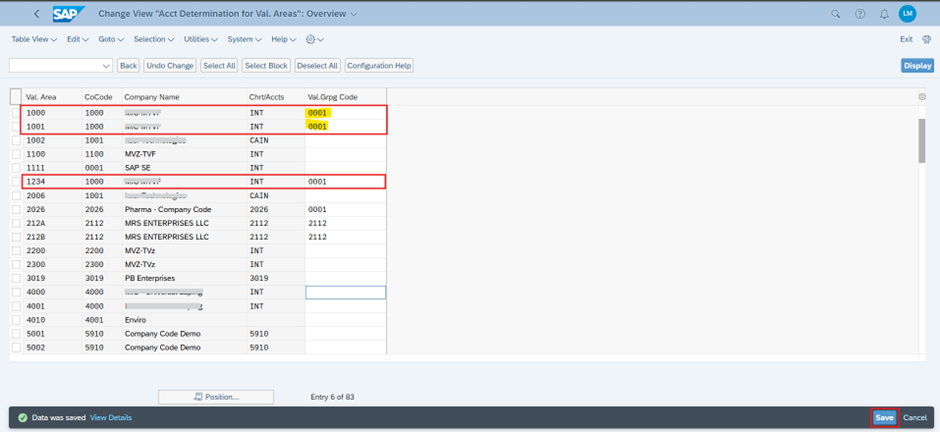
Path: IMG > MM > Valuation and Account Assignment > Account Determination without Wizard > Group Together Valuation Areas
여러 공장 또는 평가 영역을 동일한 평가 그룹 코드에 할당합니다.
이렇게 하면 각 공장에 대해 별도의 총계정원장(G/L) 계정 구성을 유지할 필요가 없습니다.
(일반적으로 1 Company Code = 1 GL - 독립적 BS / PL -독립적 회계단위)

Step 3: Define Account Category Reference (Transaction: OMWM)
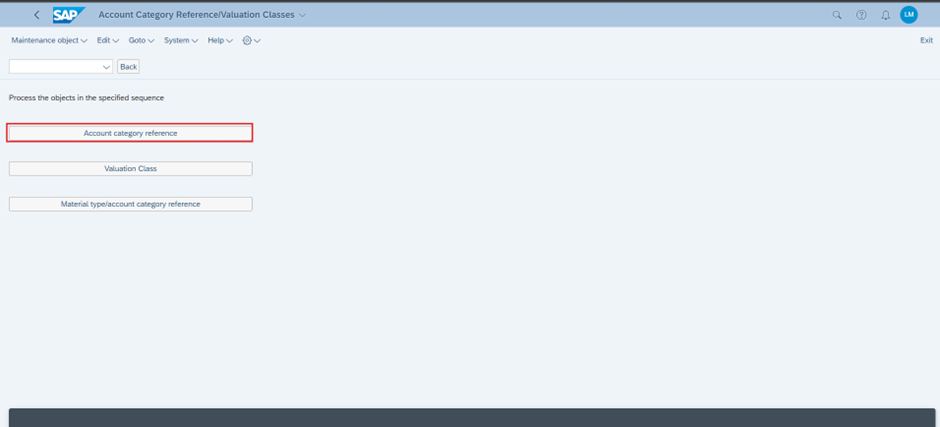
Path: IMG > MM > Valuation and Account Assignment > Account Determination without Wizard > Define Valuation Classes
계정 범주 참조(ACR)를 설정합니다.
자재 유형(material type)과 평가 등급(valuation class)을 연결하는 4자리 코드입니다.
이 코드를 통해 어떤 평가 등급을 어떤 자재 유형에 할당할 수 있는지 제어할 수 있습니다.

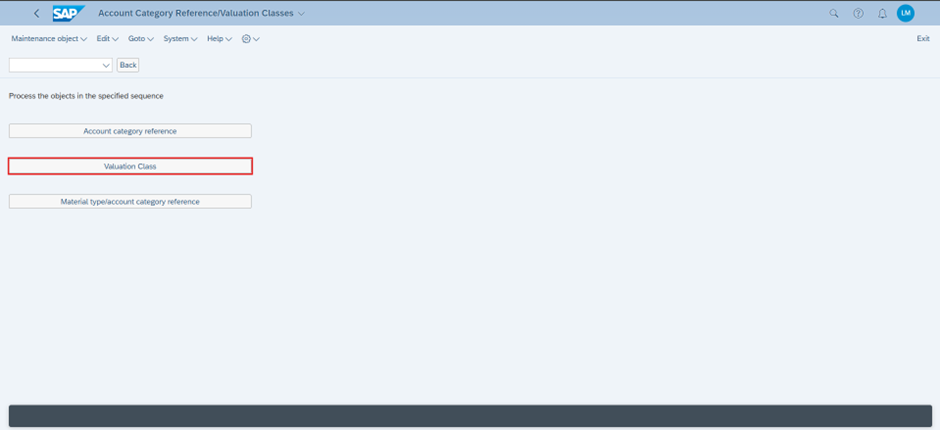

Material type에 따른 표준 평가 등급(Material Class)이 존재합니다.
이를 복사하여 커스텀 자재 유형에 대한 평가 클래스를 만들고, 이전에 만든 계정 범주 참조에 할당했습니다.
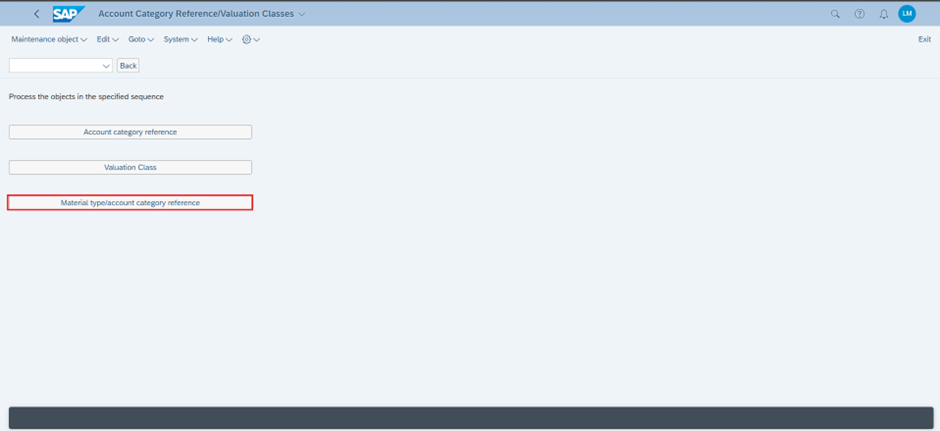


Step 4: Assign Account Category Reference to Material Type
This reduces manual input and aligns material types with relevant financial postings.

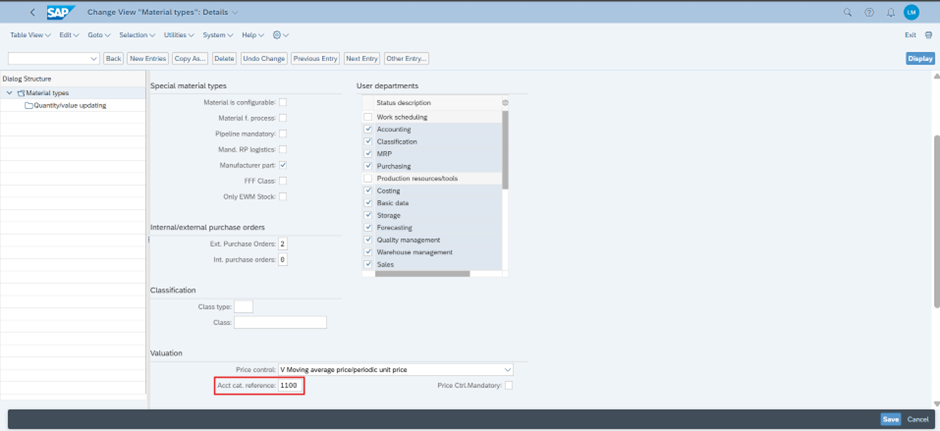
In the Material Master View

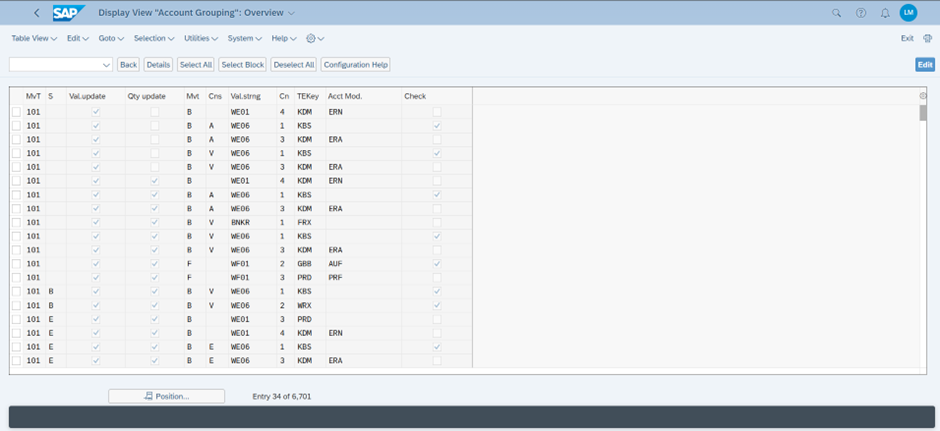
Step 5: Define Account grouping for Movement Types (Transaction: OMWM)
Path: IMG > Material Management > Valuation and account assignment > account determination > account determination without wizard > Define Account Groupings for movement types.
참고: SAP가 요구 사항에 따라 비즈니스에 필요한 모든 이동 유형을 제공했으므로
이동 유형을 생성하거나 어떠한 변경도 하지 않겠습니다.
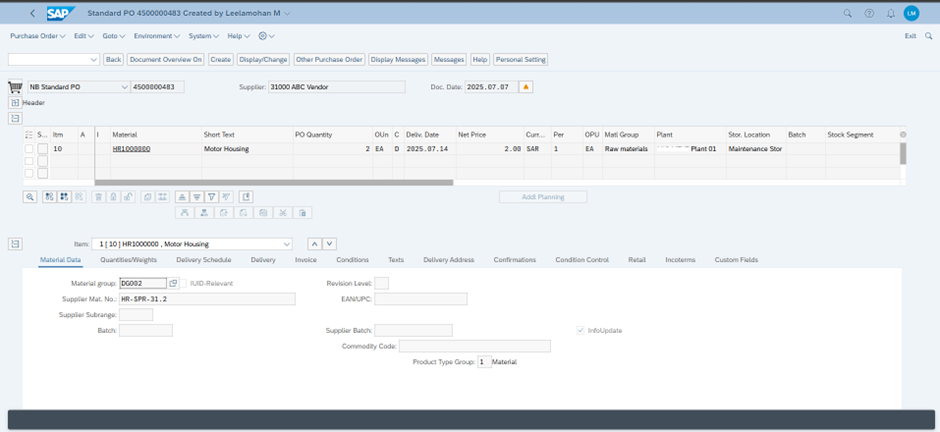
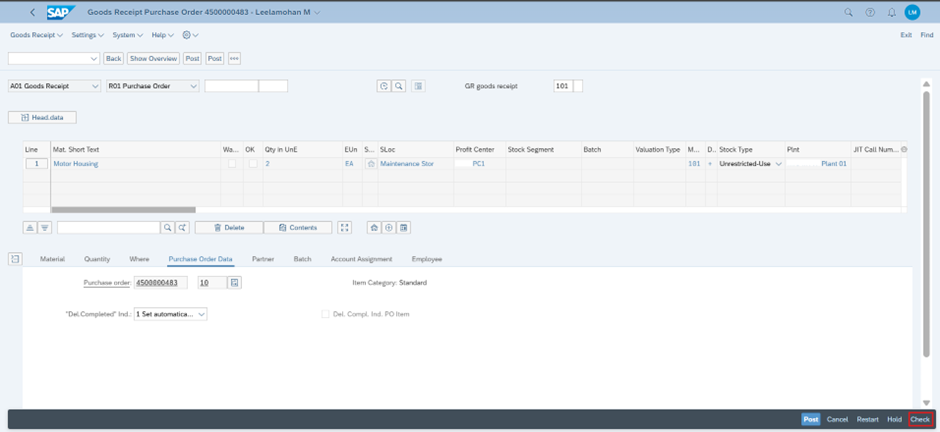
Step 6: Try creating a PO and post a GR against the PO
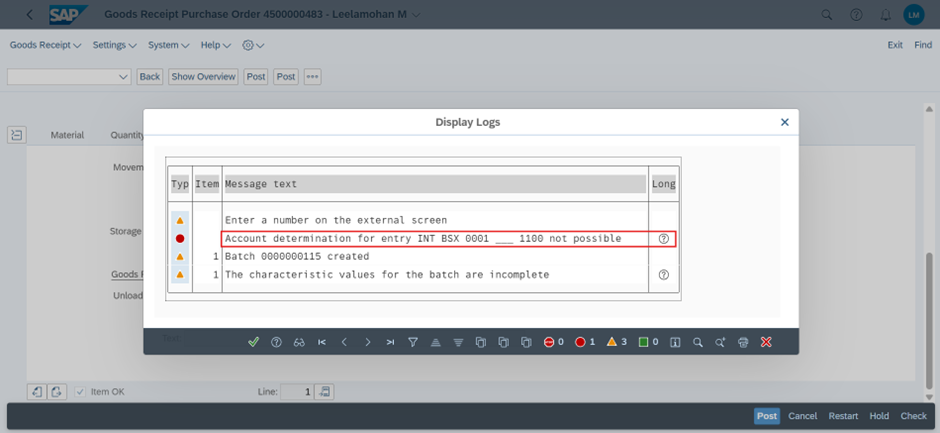
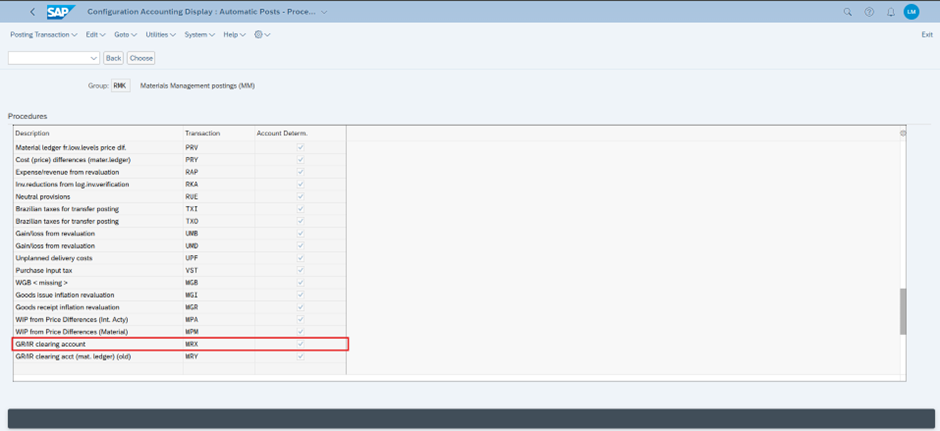
Step 7: Automatic Account Posting (Transaction: OBYC)
PATH: IMG > Material Management > Valuation and account assignment > Account determination > Account determination without wizard > Configure automatic postings
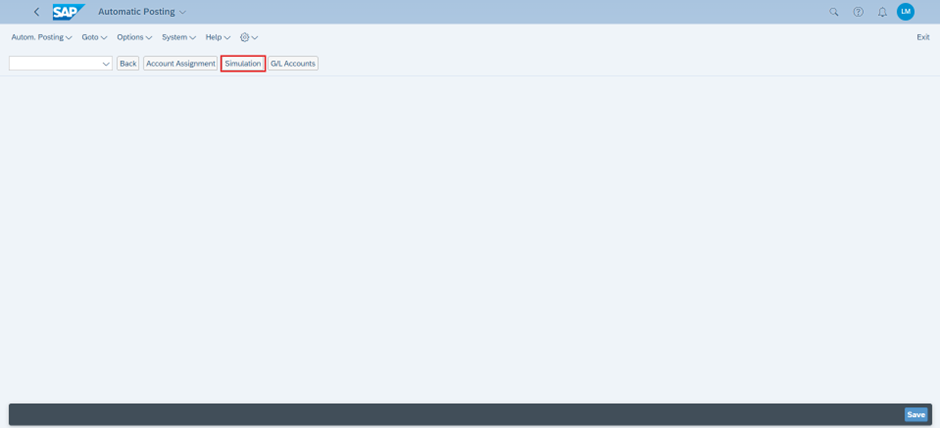
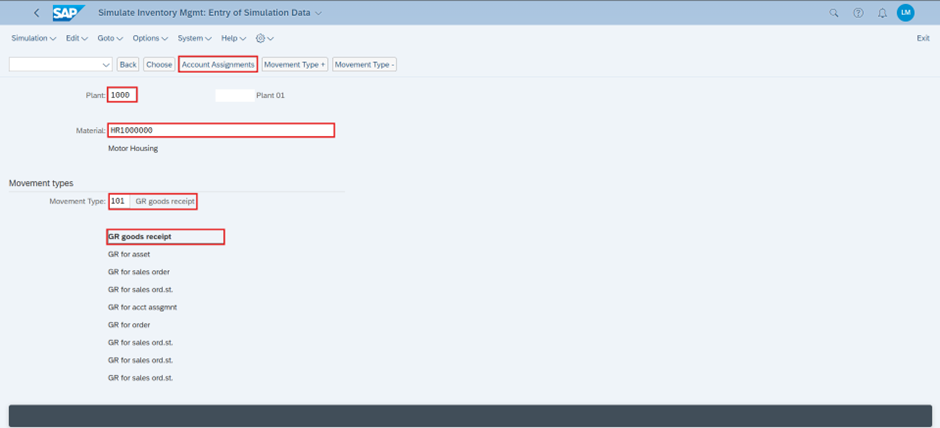
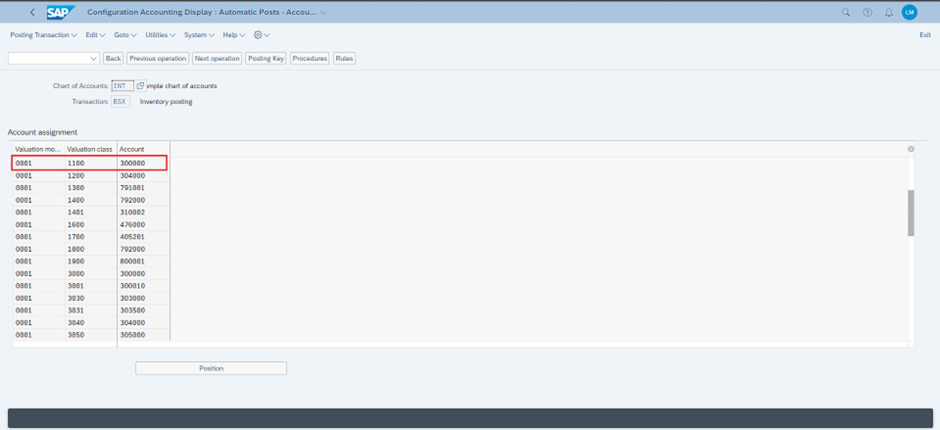
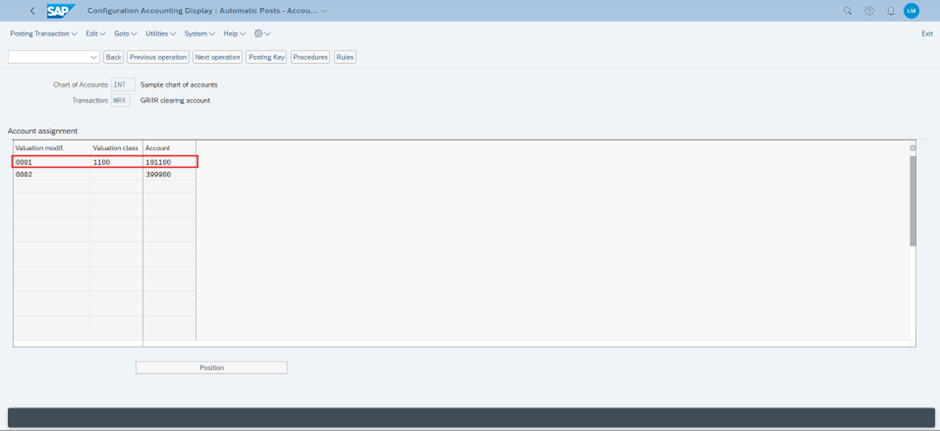
Use simulation tools to verify how SAP derives the accounts based on:
- Company Code: 1000
- Valuation Group Code: 0001
- Material type: ZROH
- Valuation class: 1100
- Movement Type: 101
- Plant: 1000
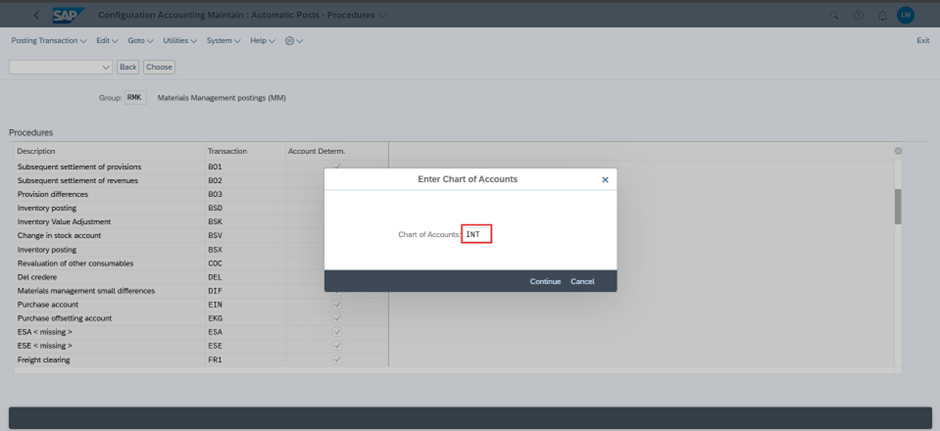
- Chart of Accounts: INT
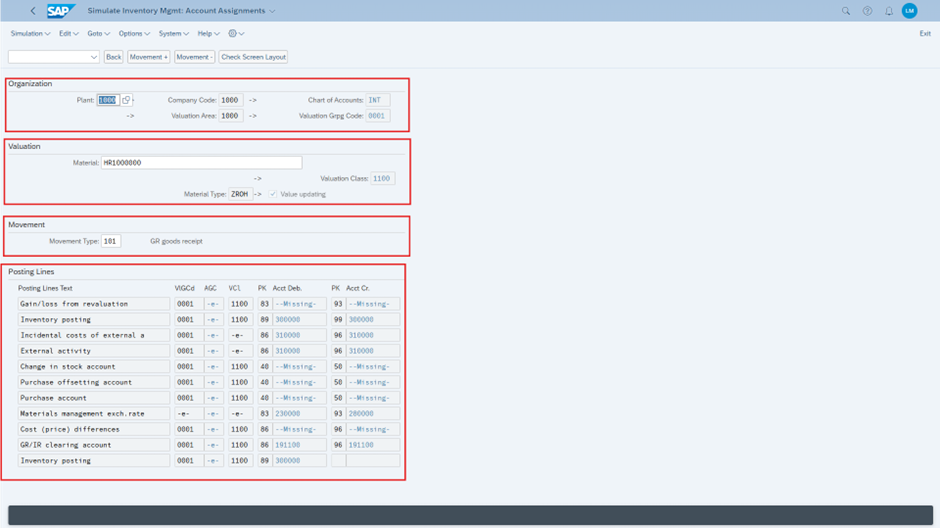
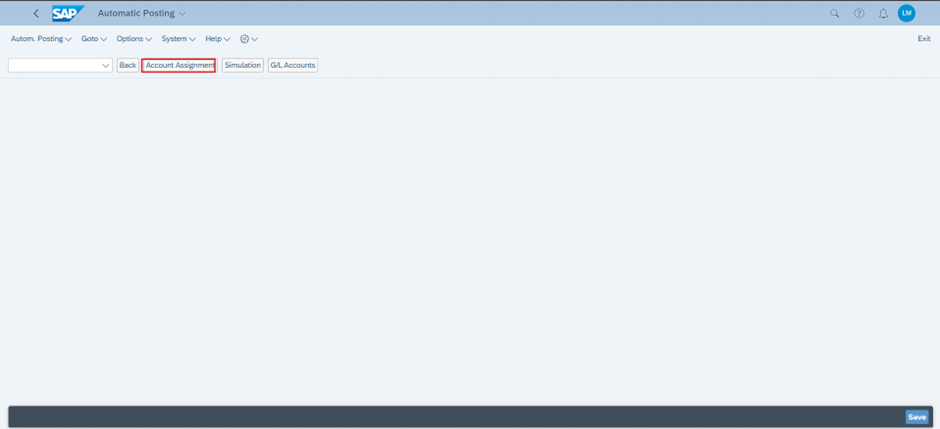
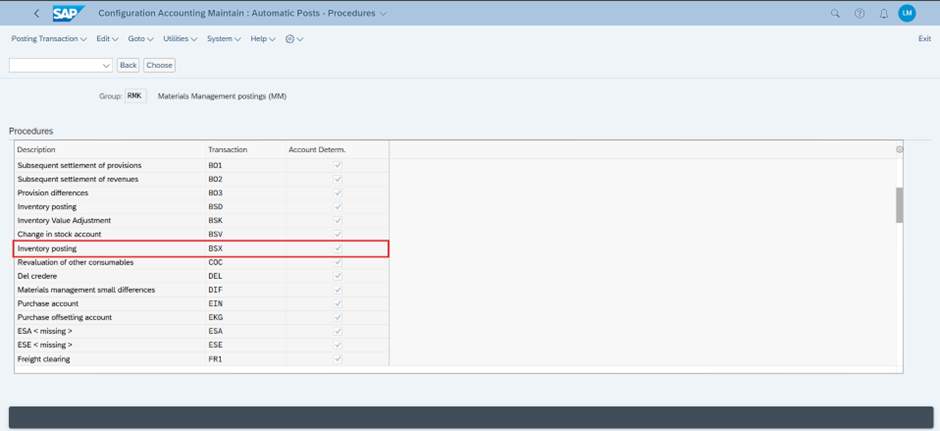
- BSX – Inventory Posting
- WRX – GR/IR Clearing Account


Handling Scenarios Without a Material Master
자재 마스터를 사용하지 않고 서비스나 자재를 조달해야 하는 경우가 있습니다.
이 경우 자동 계정 결정에 다른 접근 방식이 필요합니다.
Step 1: Define material Group (Transaction: OMSF)
Path: SPRO > Logistics – General > Material Master > Settings for Key Fields > Define Material Groups

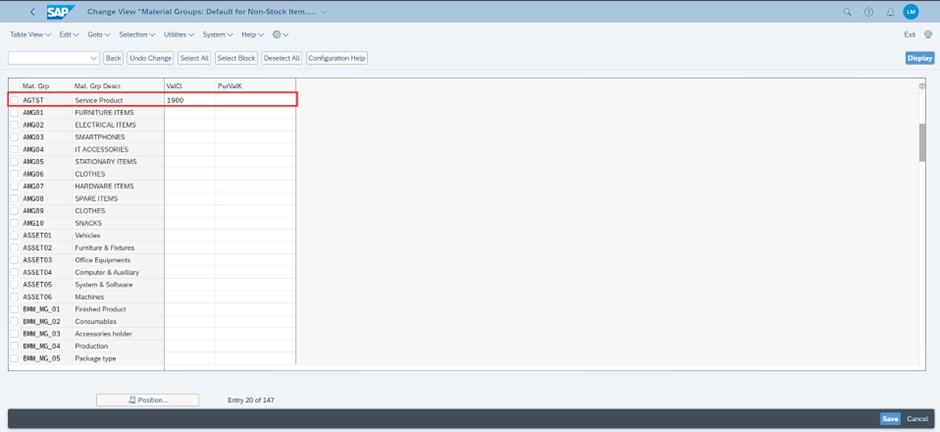
Step 2: Assign the valuation Class to the Material Group
Path: SPRO > IMG > Material management > purchasing > Material master > entry aids for item without material master
Step 3: Assign/Check General Modifier to Account Assignment
Path: SPRO > IMG > Material management > Purchasing > account assignment –maintain account assignment categories
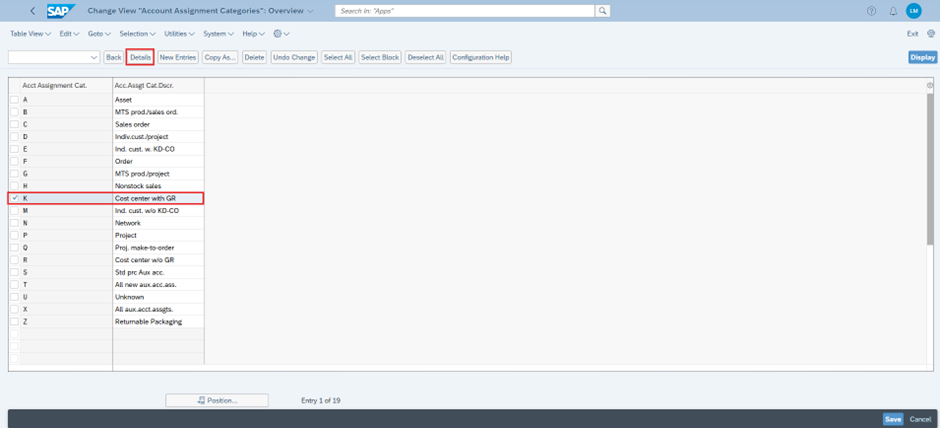
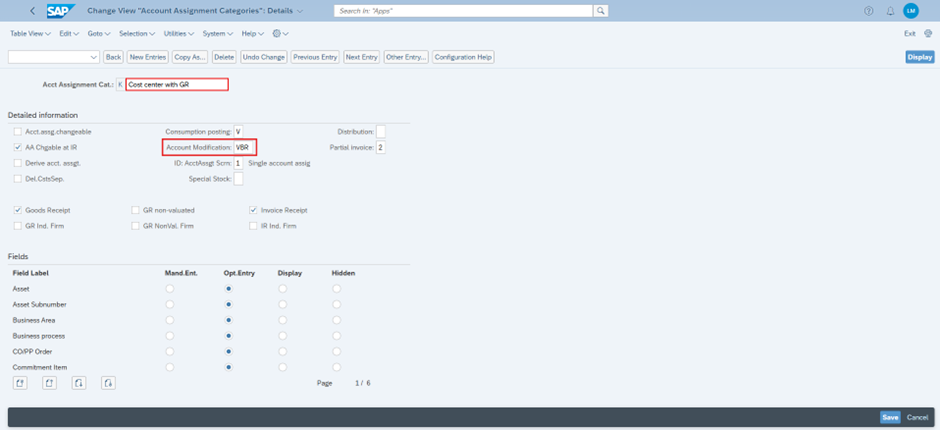
Maintain G/L accounts in OBYC under GBB-VBR (Offsetting Entry for Inventory Posting - Consumption) for relevant valuation classes or material groups.
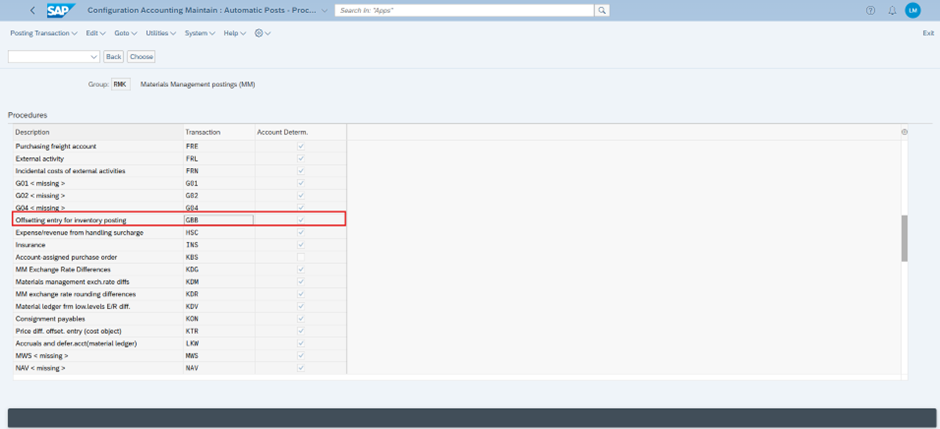
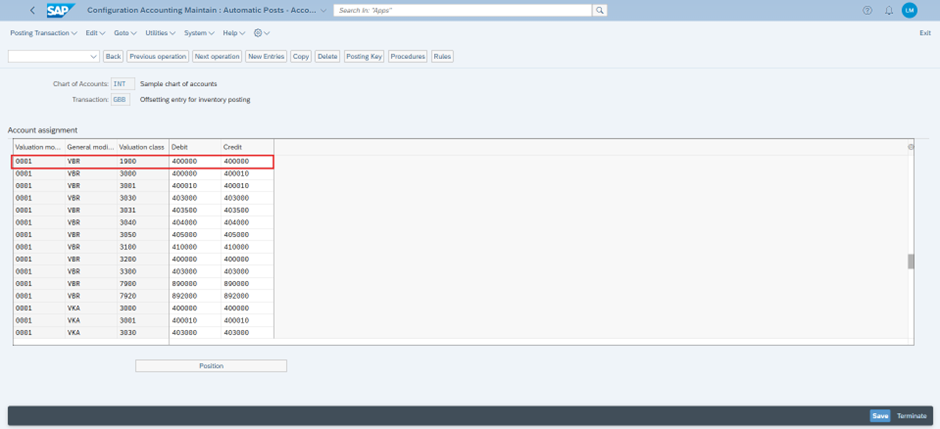
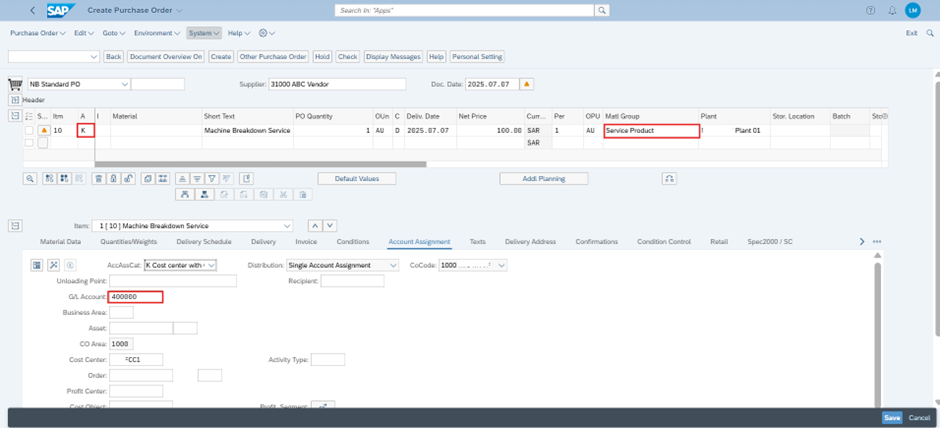
Step 4: Create Purchase Order (Transaction: ME21N
Use Account Assignment Category "K" (Cost Centre) and select the relevant material group.
The system will automatically pick the G/L account based on OBYC settings.
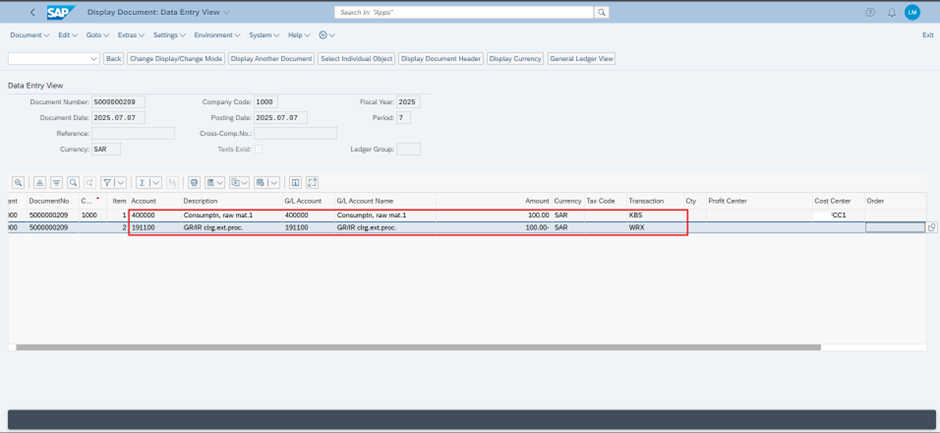
Transactions triggered:
- GBB-VBR for inventory offset
- KBS for cost centre posting

'SAP' 카테고리의 다른 글
| Intra-Company STO Process Configuration (4) | 2025.08.28 |
|---|---|
| SAP MM-FI 통합의 개념적 이해 (1) | 2025.08.23 |
| mm - blanket po(Framework Order) (2) | 2025.08.11 |
| MM - Subcontracting (1) | 2025.08.10 |
| MM - Consignment (1) | 2025.08.10 |